


| ★ TRY GAMMA FREE → 400 free AI credits — enough for approximately 10 full presentations. No credit card required. https://gamma.app/ |
Welcome to our Gamma review for 2026 — the most up-to-date, honest breakdown of whether this AI presentation tool is worth paying for and who it is actually built for.
Gamma does something that used to take hours. You type a topic or paste an outline, and it produces a complete, structured, professionally designed presentation in under 60 seconds. No blank slide staring back at you. No wrestling with layouts or colour schemes. Just a finished deck ready to present or share. With over 70 million users and a $2.1 billion valuation, this is not a side project — it is one of the most used AI tools on the planet.
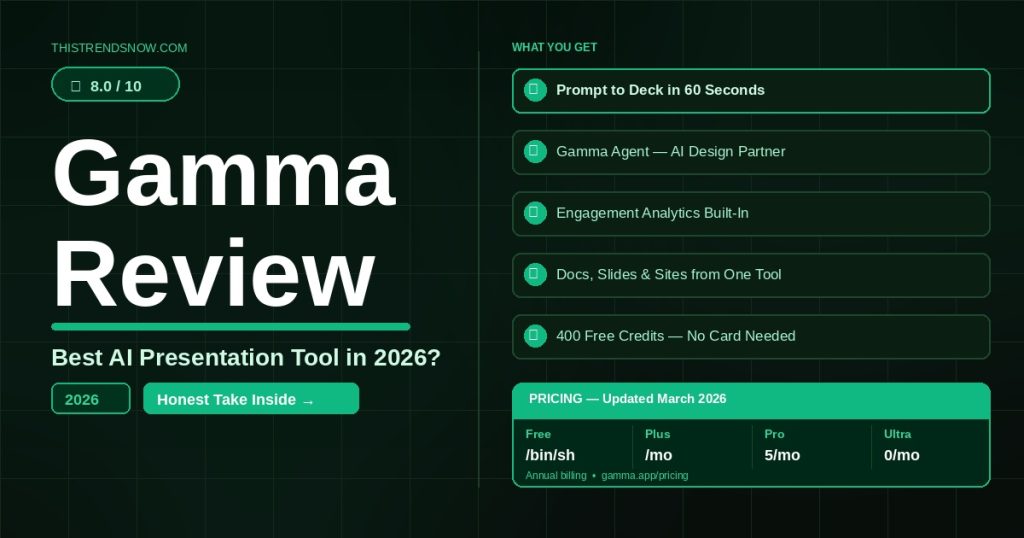
In this Gamma review, we cover everything that changed in early 2026 — the new Ultra plan, the updated Plus and Pro pricing, the Gamma Agent, and the honest truth about the PowerPoint export complaints that keep appearing in user reviews. We will tell you exactly who should pay for Gamma and who should stick with the free tier.
1. What Is Gamma?
Before the full Gamma review, here is the essential context: Gamma is an AI-powered presentation, document, and website builder that generates polished visual content from a text prompt in under 60 seconds. Unlike PowerPoint or Google Slides — which require you to build every slide manually — Gamma uses a modern card-based format and over 20 AI models to generate text, images, layouts, and design elements automatically.
Gamma was founded in 2020 by Grant Lee, James Fox, and Jon Noronha. It achieved SOC 2 Type II certification in October 2025, is GDPR and CCPA compliant, and reached $100 million in annual recurring revenue before its $2.1 billion valuation was announced. The platform supports over a dozen interface languages and generates content in dozens more, with Arabic, Farsi, Hebrew, and Urdu RTL support currently in beta.
The most important recent development is Gamma 3.0 and the introduction of the Gamma Agent — an AI design partner that researches the web, refines content, restyles entire decks, and provides design feedback through natural language conversation. This moved Gamma from a fast slide generator to something closer to an autonomous presentation assistant.
2. Who Is Gamma For?
Gamma delivers clear value for a specific type of user. Here is who gets the most from it.
- Entrepreneurs and startup founders who need pitch decks, investor updates, and product demos without a designer
- Marketers and content teams producing presentations, reports, and landing pages at high volume
- Educators and course creators building lesson materials without spending hours on slide design
- Freelancers and consultants who deliver client-facing presentations regularly and need to look polished fast
- Sales teams who need to personalise decks quickly without breaking brand guidelines
- Anyone who dreads opening PowerPoint and just wants something that looks good immediately
Gamma is not the right fit for users who need pixel-perfect PowerPoint compatibility for enterprise workflows. If your presentations must export flawlessly into PowerPoint and retain exact formatting across your organisation, the export limitations we cover in Section 5 may be a dealbreaker. For web-first sharing and client presentations via link, Gamma is excellent. For internal corporate decks that live inside PowerPoint forever, it is more complicated.
3. Key Features
AI Generation — Prompt to Presentation in 60 Seconds
Type a topic, paste an outline, or upload a document — and Gamma produces a complete, structured presentation with text, images, and professional layouts in under a minute. The quality of the first draft is genuinely impressive for broad topics. For niche or technical subjects, the output requires more editing, but the time saving versus building from scratch is significant regardless. The free plan includes 400 one-time credits — enough for approximately 10 full presentations to evaluate the tool properly.
Gamma Agent — AI Design Partner
Available on Pro and above, the Gamma Agent is the most significant feature addition in 2025. It researches the web in real time, pulls in citations, restyles entire decks based on natural language requests, and refines content by incorporating links or screenshots you drop in. Instead of generating a deck and then manually editing, you have a conversation with the Agent until the result matches your vision. This is the feature that separates Gamma from simpler AI slide generators.
Multi-Format Output
Gamma does not just make presentations. The same tool produces documents, websites, and social media content from the same prompt. A single brief can generate a presentation, a one-page summary document, and a shareable microsite simultaneously. For content teams producing across multiple formats, this reduces the need for separate tools significantly.
Engagement Analytics
Available on Pro and above, Gamma tracks viewer engagement when you share presentations via link — who viewed it, how long they spent, and how far they scrolled. For sales teams and content marketers who share presentations externally, this is valuable data that PowerPoint and Google Slides cannot provide natively. You know which slides hold attention and which lose the audience.
Integrations and Embeds
Gamma supports embedding Figma, Miro, Airtable, Power BI, YouTube, Typeform, and more directly into presentations. Interactive elements including live charts, forms, and web apps can all be embedded. The Generate API, now in general availability since January 2026, lets developers create presentations programmatically at scale via Zapier, Make, or custom integrations. For teams with existing workflows, this removes the copy-paste friction that limits most presentation tools.
4. Gamma Review: Pricing Breakdown 2026
Here is the complete Gamma review of current pricing — confirmed and updated for 2026. Annual billing saves approximately 20% across all paid plans.
| Plan | Monthly Price | Annual Price | Best For | Key Limits |
| Free | $0 | $0 | Evaluation only | 400 one-time credits (no monthly reset), Gamma branding on all exports, up to 10 cards per creation |
| Plus | $10/month | $8/month | Solo creators removing branding | Unlimited AI creation, no branding, advanced image models, up to 20 cards per creation |
| Pro | $20/month | $15/month | Professionals needing analytics and API | Everything in Plus, premium AI models, custom domains, analytics, custom fonts, API access, up to 50 cards |
| Ultra | $100/month | $90/month | Power users needing maximum AI | Most advanced AI models, 75-card decks, AI animations, early access features, Studio Mode |
| Note on the free plan: The 400 credits are one-time only — they do not reset monthly. Once they are gone, you either upgrade or stop generating new content with AI. This is a common surprise for new users. Annual billing link: https://gamma.app/pricing |
5. The PowerPoint Export Problem — Honest Assessment
This is the section most Gamma reviews skip. It is the most important thing to know before you pay.
Gamma’s native format is web-first and card-based — it is designed to be viewed as a link or in a browser. When you export to PowerPoint (.pptx), the formatting does not always translate cleanly. Users consistently report missing fonts, broken layouts, misaligned images, and design elements that look completely different from what they saw in Gamma’s editor.
| The honest verdict on exports: If your presentations live and die inside PowerPoint — shared internally, edited by colleagues, presented from a USB drive — Gamma’s export limitations are a genuine problem. If your presentations are shared via link, embedded on websites, or exported to PDF, Gamma is excellent. Know your workflow before you pay. |
Gamma holds 4.3 out of 5 on the Microsoft Store but only 2.0 out of 5 on TrustPilot — and the majority of negative reviews cite this exact issue. The gap between those two scores tells you everything: users who experience Gamma in its native web environment love it. Users who need PowerPoint compatibility are frequently disappointed.
6. Pros and Cons
| Pros | Cons |
| Fastest AI presentation generation we have tested — under 60 seconds | PowerPoint export has consistent formatting issues — major for corporate users |
| Gamma Agent researches web in real time and refines decks conversationally | Free plan credits are one-time only — 400 credits do not reset monthly |
| Multi-format output: presentations, docs, websites, social from one tool | Repetitive design patterns after extended use — decks can start looking similar |
| Engagement analytics on Pro — track who viewed and how long they engaged | AI Agent and analytics locked behind Pro at $15/month — not on Plus |
| Generate API now GA — programmatic presentation creation at scale | Less customisation than PowerPoint for users who need precise control |
| Generous free tier — 400 credits enough for real evaluation | Ultra plan at $90/month is expensive for features most users will not need |
7. Gamma Review: How It Compares to Canva and Beautiful.ai
No Gamma review is complete without comparing it to the two tools people most commonly consider alongside it.
| Gamma Pro | Canva Pro | Beautiful.ai Pro | |
| Annual price | $15/month | $15/month | $12/month |
| AI presentation generation | Yes — best in class speed | Yes — limited | Yes — template-driven |
| PowerPoint export | Yes — formatting issues | Yes — reliable | Yes — reliable |
| Web-first sharing | Yes — native format | Yes | Limited |
| Engagement analytics | Yes | No | Yes |
| Multi-format output | Yes — docs, sites, social | Yes — broad | No — presentations only |
| Free tier | Yes — 400 one-time credits | Yes — generous | Yes — limited |
The honest comparison: Canva Pro at the same $15 per month price is the stronger choice for users who need reliable PowerPoint export and broader design capabilities beyond presentations. Beautiful.ai is worth considering for teams who need consistent brand-aligned presentation templates with reliable exports. Gamma wins decisively on AI generation speed, the Gamma Agent, multi-format output, and web-first presentation sharing. The right choice depends entirely on whether PowerPoint compatibility matters in your workflow.
8. Our Honest Verdict
| ThisTrendsNow Score: Gamma — 8.0 / 10 |
Our gamma review verdict: Gamma is the fastest and most capable AI presentation tool for web-first workflows in 2026. The 60-second generation, the Gamma Agent, and the multi-format output make it genuinely impressive for the right user. The $8 per month Plus plan annual is outstanding value for solo creators who share presentations via link and do not need PowerPoint compatibility.
The PowerPoint export issue is real and well-documented. We are not going to pretend otherwise. If your workflow lives inside PowerPoint, Canva is the more reliable choice at the same price point. But if you present via link, embed in websites, or share as PDF, Gamma’s native experience is hard to beat.
Our recommendation: use the 400 free credits to build three or four real presentations. If the output quality meets your standard and you share via link rather than PowerPoint, the Plus plan at $8 per month annual is a straightforward yes. If you need PowerPoint, test the export quality on your specific content before committing to a paid plan.
| Who should buy it: Entrepreneurs, freelancers, marketers, and educators who create presentations regularly and share them via link or PDF. The Plus plan at $8/month annual is the entry point. Upgrade to Pro if you need analytics and the Gamma Agent. |
| Who should skip it: Users who need flawless PowerPoint export for corporate workflows, or teams whose standard is to share and edit decks inside PowerPoint internally. Canva Pro or Beautiful.ai are more reliable choices for those use cases. |
★ TRY GAMMA FREE → https://gamma.app/
400 free AI credits — no credit card required. Enough for approximately 10 full presentations.
Related articles coming soon: Best AI Presentation Tools 2026 | Gamma vs Canva | Beautiful.ai Review